
Find What Page One Website Use with BuiltWith & PageSpeed
 The secret to page one in google results in Florida is in the fine details but small businesses don’t have to guess anymore. Any small business owner in Florida can research what actually works online to get a return on investment and make money. Small businesses don’t have to guess what makes top-ranking websites successful. By combining BuiltWith and PageSpeed Insights, you can reverse-engineer the tech stack and performance metrics of page-one competitors to pinpoint exactly what they’re doing right.
A website audit is like a check-up for your online business. It tells you what’s working, what’s dragging you down, and what’s quietly sabotaging your search engine rank behind the scenes. In this guide, you’ll use BuiltWith and PageSpeed Insights to uncover the real story behind your site’s performance.
Step 1: Use BuiltWith to Analyze the Tech Stack
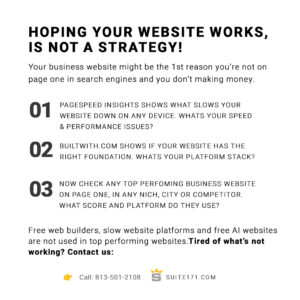
Head to BuiltWith.com and enter your website’s URL. BuiltWith will scan the site and show you. Then pick a any competitor website and do the same. You should also do this for marketing niche, location, top three website that are page one results.
- What CMS it’s built with (WordPress, Wix, etc.)
- Any analytics, tracking, or marketing tools installed
- Frameworks, JavaScript libraries, and plugins used
- Security layers and e-commerce platforms (if any)
Why this matters: Understanding your tech stack helps you identify performance issues, plugin overload, or outdated platforms like Wix, GoDaddy Builder or Squarespace that may hurt SEO or slow down your site.
Step 2: Use Google PageSpeed Insights
Next, go to PageSpeed Insights and enter your website’s URL. You’ll get a score out of 100 for both mobile and desktop, plus a breakdown of how your site loads.
Look out for:
- Core Web Vitals like LCP (Largest Contentful Paint), FID (First Input Delay), and CLS (Cumulative Layout Shift)
- Opportunities to improve, such as image compression, unused JavaScript, server response time, or lazy loading
Why this matters: Google uses speed and performance metrics to determine search rankings. Faster sites rank better and keep users happy.
Step 3: Research Any Page One Competitors in Other Markets
Want to know how businesses dominate their website SEO, and marketing outside your area are dominating search? Look them up using BuiltWith and PageSpeed Insights too.
- Search for businesses in your niche but in bigger or more competitive cities
- Run their URLs through BuiltWith to see what tools, platforms, or marketing stacks they’re using
- Use PageSpeed Insights to compare performance and see how fast and mobile-friendly their sites are
This NLP Insight: Reverse-engineer what’s working for page-one winners and use that intelligence to build or improve your own digital strategy.
What to Do With These Results
- If you use anything other than WordPress switch it ASAP!
- Fix slow-loading scripts or remove bloated plugins
- Use BuiltWith to see what tools your competitors use
- Apply PageSpeed recommendations to improve load times
- Plan a redesign or tech switch with accurate data. Find an expert if you need help.
The Problem This Solves
Most Florida businesses don’t know why their website is slow, invisible on Google, or losing leads. This audit gives you clear answers and action steps—no guesswork, no tech jargon required.